
Marketplace facilitator and tax responsibilities
What is a marketplace facilitator
A Marketplace Facilitator is a business that is required by law to collect and remit sales tax on behalf of third party sellers when customers place orders through the facilitator’s platform. This shifts the tax collection responsibility from the seller to the marketplace.
Slice is a Marketplace Facilitator in many states. When a customer places an online order through the Slice app or website, Slice may be required to collect the sales tax and remit it to the state on your behalf.
What is typically taxed
Prepared food and beverages are almost always taxable.
In many states, delivery fees, order processing charges, and hardware fees billed to your shop, such as terminals or printers, may also be subject to tax.
You should review your local rules or contact [email protected] if you are unsure.
What Taxes Does Slice Handle?
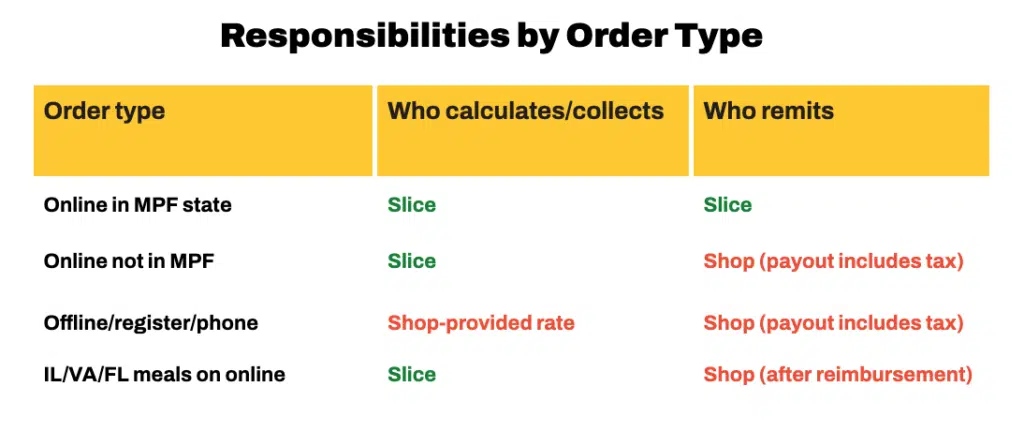
Slice handles tax differently depending on whether the order is online or offline.
Online orders
Slice is registered as a Marketplace Facilitator (MPF) in many states. For online orders placed through the Slice app or website:
- Sales tax is automatically calculated at checkout
- Slice collects the tax
- Slice remits the tax to the appropriate tax authority
- The amount is shown on your statement as “Sales Tax Withholding”
In some states, local taxes may not be covered under state Marketplace Facilitator laws. Slice is not responsible for remitting those taxes.
Marketplace Facilitator states
Slice is currently registered as a Marketplace Facilitator in:
AL, AR, CA, CO, CT, DC, FL, GA, HI, IA, ID, IL, IN, KY, MD, ME, MI, MN, MO, NC, ND, NE, NJ, NM, NV, OK, PA, RI, SC, SD, TX, UT, VA, VT, WA, WI, WV, WY
If Slice is not a Marketplace Facilitator in your state
- Tax appears on your statement as Tax Collected
- The tax amount is included in your payout
- You are responsible for remitting it to the appropriate tax authority
If you are unsure which applies to your shop, contact [email protected].
Meals tax and other special cases
Florida, Virginia, and Illinois
Slice collects meals tax on online orders and reimburses it monthly.
You will see this as “MM.YYYY Meals Tax Reimbursement” in the Other Adjustments section of your statement.
You are responsible for remitting this meals tax to your local tax authority.
All other Marketplace Facilitator states
In all other states where Slice is registered as a Marketplace Facilitator, Slice remits applicable meals and local taxes directly to the tax authorities on your behalf. No action is required from you for online orders.
Texas
In Texas, sales tax may apply not only to food, but also to order processing fees and per order platform fees.
These taxable items may appear in your statement or tax reports and are handled directly by Slice.
Square POS
For orders routed through Square, tax is calculated using the flat rate stored in Slice, not the rate in your Square system.
If your rate needs to be updated, contact [email protected].
Register (POS) and offline orders
Offline orders are taxed using a rate that you are responsible for providing and keeping up to date. This applies to:
- Register (POS) orders
- Phone orders
- Payments run through a Slice terminal tied to your POS
You are responsible for:
- Setting the correct combined rate, including state, local, and meals tax if applicable
- Keeping that rate up to date
- Reporting and remitting the collected tax to the appropriate tax authority
You cannot update your register tax rate yourself. If your rate is incorrect or not set up, contact [email protected].
Using the tax report
The Tax Report provides a detailed view of sales tax activity over a selected time period.
To access it:
- Go to Owner’s Portal
- Select Financials
- Select Reports
- Select Tax Reports
From there, you can:
- Select “Create New Report” to generate a report
- Use the download icon to export it
Tax report fields
- Sales Subtotal – Total sales, including online and offline.
- Online Sales Subtotal – Slice app and website orders.
- Offline Sales Subtotal – Register (POS) orders.
- Offline Taxable Sales – The portion of offline sales subject to tax.
- Online Sales Tax Collected – Tax collected on online orders.
- Offline Sales Tax Collected – Tax collected on Register (POS) orders.
- Total Sales Tax – Combined total tax collected.
- Total Withheld by Slice – Tax already remitted by Slice to the state or local jurisdiction.
- Tax Due by Shop – Any remaining tax you are responsible for filing and remitting.
- This amount applies to your Register (POS) sales.
Frequently asked questions
- Can I change my tax rate?
- No. Contact [email protected] and the rate will be updated for you.
- I am not charging meals tax on Register (POS) orders. Can this be fixed?
- Yes. Contact [email protected] with your correct rate.
- Where can I see taxes collected for a specific time period?
- Go to Financials, then Reports, then Tax Reports and generate a report.
Need help
For tax related questions, rate changes, statement questions, or help reading reports, contact: [email protected]Reminder: As with all taxes collected by Slice, you are responsible for understanding your local filing obligations