
Getting Started

Welcome to the Slice Owner’s App – Web!
The Owner’s App is our all-in-one platform for managing and growing your business with Slice. Here, you’ll find everything you need to start, from setting up your account to mastering the tools that help you streamline operations and connect with customers.
Logging In
- Open your web browser and go to owners.slicelife.com.
- In the Email field, type the email address associated with your Slice account.
- In the Password field, type your password.
- Once you’ve entered your email and password, click the Log In button to access your account.

Two-step verification
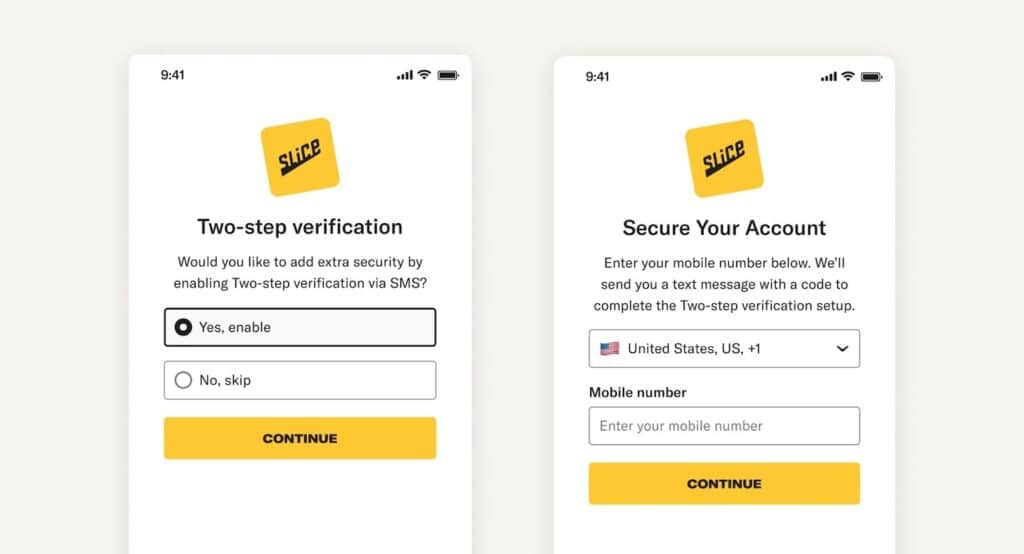
Two-step verification adds an extra layer of security to your Owner’s App (web) account. After you enter your email and password, you will be asked to confirm your login with a one-time code sent to your mobile phone.
When two-step verification is enabled:
- You receive a six-digit code by text message after logging in
- The code is required to finish signing in
- This helps protect your account if your password is ever compromised
You can turn two-step verification on or off from Settings in the Owner’s App (web). If you change your mobile number, you will need to disable and re-enable two-step verification to set up the new number.
Forgot Password?
Click “Forgot password?” on the login screen if you forget your password. Follow the prompts to reset your password via email. If you forget the email address linked to your account or need assistance, call (888) 974-9928 for 24/7/365 live assistance.
Home
The Slice Owner’s App Home Page is your hub for monitoring shop performance, managing orders, accessing statements, and discovering personalized recommendations. Here’s what you’ll find:

The Dashboard provides a live view of your shop’s current performance and an easy way to track past results.
Real-time sales tile
At the top of the page, you’ll see the real-time sales tile. This shows today’s numbers as they happen.
- Sales: Total dollars from confirmed orders today
- Orders: Total number of orders so far today, with a comparison to the same day last week
- Voids: Number of voided orders today
This matches what you see in the mobile app. The numbers update automatically without refreshing the page.
If you see voided orders, scroll down to Voided Sales to learn more.
Top metrics
Below the real-time tile, you’ll see a snapshot of your shop’s performance across any date range:
- Total Orders: Number of orders placed during the selected time period
- Total Sales: Revenue from all processed orders during that time
- Average Order: Average dollar amount per order
- Voided Sales: Total value of canceled or voided transactions
Use the date picker to adjust the time range and compare performance across different days or weeks.
Your orders
The chart at the bottom shows how many orders you received each day in the selected time period. This helps you spot trends and plan ahead.

Recent online order activity
This section gives you a closer look at your most recent online orders.
You’ll see a list that includes:
- Order number
- Date and time
- Customer name
- Order type (pickup or delivery)
- Subtotal, tax, tips, and total
- Order status
Use this list to spot any unusual activity, track sales trends, and review any canceled or voided orders.

Statements
This section shows your payout history from Slice.
You’ll see a list of recent statements, including the date and amount for each payout. Use the Download button on the right to get a PDF summary of any statement.

Learn how to avoid scams
This page helps protect your shop by highlighting common scam tactics and providing guidance on how to avoid them.

Security PIN
You’ll find your Security PIN in the top-left corner of the Owner’s App. This code helps confirm your identity when you call support.
Do not share your PIN with anyone except a verified Slice representative. If someone contacts you claiming to be from Slice and you’re unsure who they are, please call us at (855) 237-4992.